What Matters More Than Semantic HTML Tags
Introduction
As front-end engineers, while we don’t need to memorize every single HTML tag by heart, we still need a solid understanding of common HTML tags and their use cases—such as <section>, <main>, <article>, h1–h6, <aside>, <footer>, <a>, <button>, and so forth—so we can apply them appropriately.
However, what is the actual purpose of using semantic tags? I’ve noticed that many articles only scratch the surface, focusing solely on debates over which tag should be used in which specific scenario. This leads to codebases where HTML tags look colorful and diverse, yet the user experience doesn’t see any real improvement.
I believe this easily fosters a misconception among front-end developers that failing to use semantic tags is some kind of cardinal sin, leading them to subconsciously avoid using <div> or <span> altogether. So, I’d like to share some of my thoughts on this topic.
A Bit of History
In the early days of HTML, there were many non-semantic tags such as <b>, <font>, and <center>. These tags carried no intrinsic meaning and were used purely for styling. Later, when CSS came along, styling no longer needed to be described via HTML tags. This was likely the context in which the term “semantic tags” first emerged, and HTML5 has since deprecated these purely decorative tags.
The Purpose of Semantic Tags
To me, semantic tags mainly serve these purposes:
- Accessibility: Helping screen readers parse and read content better through appropriate HTML tags.
- Helping search engines understand page structure, thereby improving SEO.
Therefore, this article will revolve around these two core points.
HTML Tags Aren’t Always Enough
When structuring a web page, experienced developers divide the layout into main, nav, aside, footer, and so forth to sketch out the primary architecture. When building forms, experienced developers also add labels and corresponding inputs to take full advantage of native browser capabilities.
There is certainly nothing wrong with these practices. However, this approach often overlooks one crucial fact: web interactions are incredibly diverse, and many UI components cannot be easily expressed using existing HTML tags alone.
Front-end engineers can follow the aforementioned broad principles to build a layout, but when a UI component isn’t covered by standard HTML tags, it’s easy to fall into the trap of obsessing over which tag is “best.” For example, what tag should you use for components like tooltips, carousels, notification bars, or chat rooms?
This is a frequent dilemma in real-world development, yet many articles fail to address it.
Looking at It from an Accessibility Perspective
Semantic tags are not the end goal; they are a means to an end. To me, the most important objective of semantics is achieving accessibility. By utilizing native HTML tags, we reduce the hassle and inconsistency of custom implementations, achieving the best results with minimal effort.
When you look at the problem through the lens of accessibility, the solution becomes much clearer.
If accessibility is implemented properly, a website built entirely out of divs can still provide a great experience (theoretically feasible, though in practice there are too many nuances and edge cases to consider, so we generally don’t do this).
Promoting semantic tags everywhere without discussing accessibility feels to me like just chasing after political correctness.
Take the notification bar mentioned earlier: which HTML tag should you use in that scenario? Semantic HTML often presents these ambiguous cases, or sometimes there simply isn’t an appropriate tag to describe the UI at all.
Yet once you approach it from an accessibility standpoint, you realize the problem boils down to a few key questions:
- Can screen readers detect changes in the notification bar?
- Can users dismiss the notification bar without using a mouse (e.g., via keyboard navigation)?
These are the elements that genuinely impact user experience.
In this scenario, rather than dwelling on which tag looks best, focusing on how to provide a better user experience is far more important. The implementation isn’t magically finished just because you used an HTML tag that looks more “sophisticated.”
This isn’t to say that semantic HTML tags aren’t important at all—tags like main, section, article, header, and footer are still tremendously helpful for search engines to identify page structure.
Introducing Structured Data (JSON-LD)
JSON-LD is an approach where you include a <script> tag on your web page and define the page structure using JSON, making it easier for search engines to parse your content.
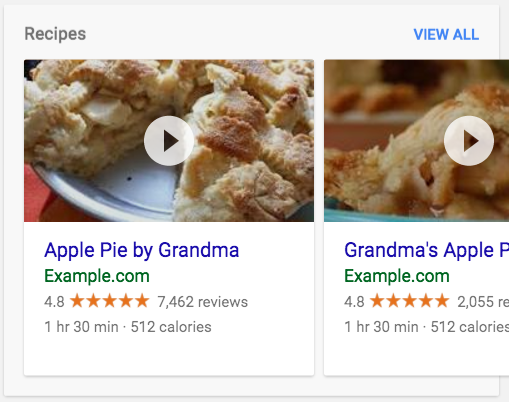
Beyond simply parsing content more effectively, for pages such as reviews, recipes, news articles, or FAQs, it allows Google and other search engines to generate specialized rich search results, helping users find the information they need more easily.
Semantic Tags and SEO
Web crawlers do reference heading structures like h1, h2, h3, and attempt to parse content through tags like main. Therefore, to a certain extent, developers still need to understand HTML tags.
However, if your primary motive for using semantic HTML tags is SEO, then as a front-end engineer, you should pay much closer attention to other factors that have a far greater impact on SEO:
- Have you properly added SEO-boosting meta tags such as
title,description, and a sitemap in the<head>? - Have you included Open Graph meta tags, such as preview cards for Twitter or Facebook?
- Have you implemented SSR (Server-Side Rendering)?
- Can the page leverage JSON-LD?
The factors listed above have a much more pronounced effect on SEO.
HTML tag structure is merely the final piece of the SEO puzzle. If search engines placed overwhelming weight strictly on the h1 tag, developers might as well build entire websites using only h1 tags.
The Future
We can expect more HTML tags to be introduced in the future, and native browser support for UI elements will continue to grow. UI components mentioned in this article, such as tabs and notifications, might eventually have their own dedicated tags. However, the overarching principle remains unchanged: as long as we consider how users interact with the UI during development and what capabilities the browser provides, using the right tags will become second nature—rather than a dogmatic pursuit of semantic tags for their own sake.
Conclusion
Obsessing over semantic HTML tags is putting the cart before the horse.
Semantic tags are the natural byproduct of a developer who thoughtfully considers SEO and accessibility. If these factors are accounted for from the very beginning, developers will naturally select the appropriate tags and incorporate the corresponding accessibility practices.
References
- Create semantic sites with json-ld
- On web semantics: Only discusses its advantages without mentioning the impact on SEO.
- SEO Starter Guide: Only mentions that using the semantic
<picture>tag helps SEO for image searches, but doesn’t mention much else. - Multiple H1 Headings: Mentions that using multiple
h1headings on a site does not have a significant negative impact on SEO; just useh1when appropriate.
Related Posts
- Recreating My Room with Three.js Using React Three Fiber, I brought my real room into the browser—turning physical objects into an interactive table of contents, and using spatial memory to tell the story of my life and work over the past few years.
- Things to Keep in Mind When Using Images in Frontend Development Expanding on Jake Archibald's article, this post organizes how modern responsive images should be written: why width/height are still necessary, when to use CSS aspect-ratio, how to choose between AVIF and WebP, and using picture/source/srcset for art direction on mobile devices.
- CSS field-sizing — Auto-resize Form Elements with a Single Line of CSS Previously, auto-resizing a textarea required listening to scrollHeight in JavaScript. With CSS field-sizing: content, a single line replaces it all, supporting textarea, input, and select. This article covers the pain points of older approaches and how to use field-sizing.
- Make Your Link Underlines Look Better: text-underline-offset By default, underlines sit very close to the text. Some designers dislike this look, and personally, I don't think it looks great either.