Stop Using AWS Access Keys
This article explains why using AWS Access Keys is a practice you should phase out as early as possible, and how to replace them with OIDC + IAM Roles.
The scope covers GitHub Actions CI/CD, services running on EC2/ECS, and local development environments.
What’s Wrong with Access Keys
An AWS Access Key is a set of long-term credentials consisting of an Access Key ID and a Secret Access Key.
Once created, they remain valid indefinitely unless manually deleted or deactivated.
When creating an Access Key in the AWS Console, you will also notice that AWS does everything it can to discourage you from creating one.
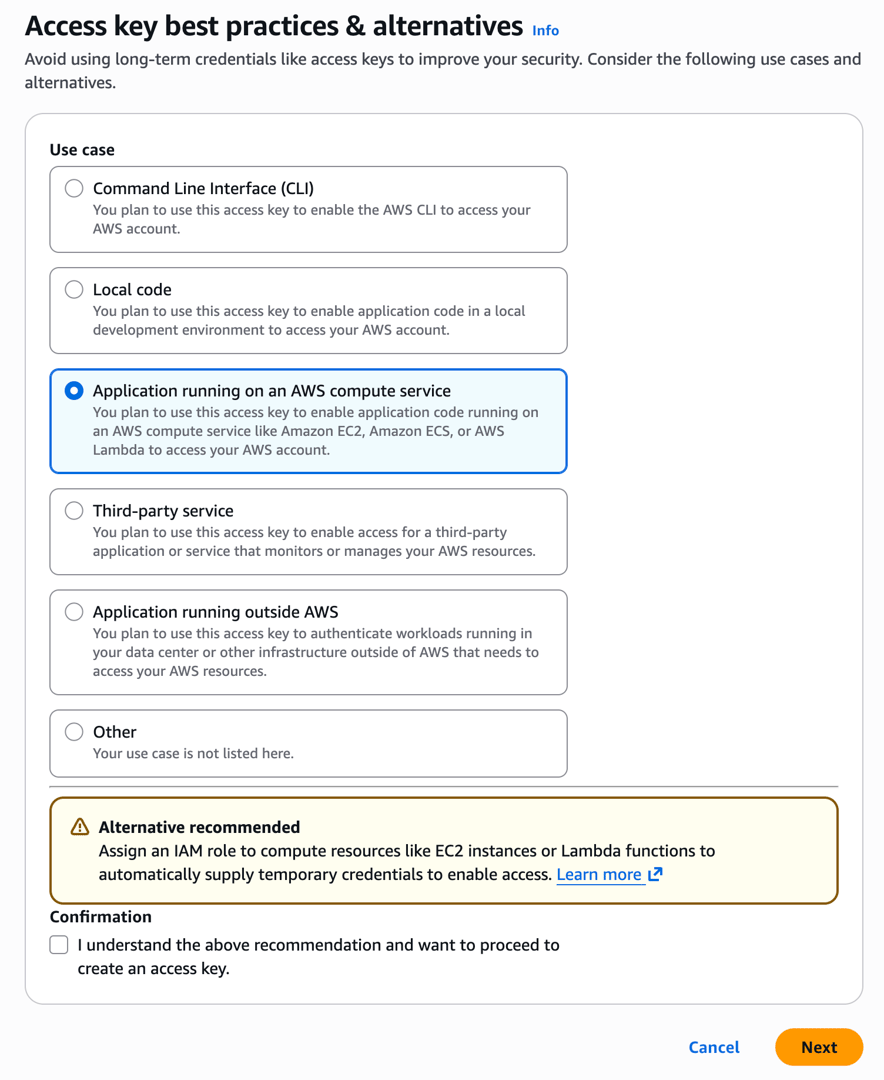
Once an Access Key is leaked, attackers can use these credentials to do virtually anything before you even notice—such as launching EC2 instances for crypto mining, downloading customer data from S3, or deleting RDS snapshots.
AWS itself explicitly states in its IAM Best Practices:
Where possible, we recommend relying on temporary credentials instead of creating long-term credentials such as access keys.
Leaks Happen More Easily Than You Think
There are many ways Access Keys can leak:
- Git history: Accidental commits of
.envor config files—even if deleted in a later commit, they remain visible ingit log. - CI/CD logs: Echoing environment variables during debugging, or a library dumping full environment variables in an error stack trace.
- Employee offboarding: If a key is tied to an IAM User, forgetting to revoke it upon departure poses a security risk.
- Shared accounts: Teams sharing the same key make it impossible to audit who performed what action when an incident occurs.
GitHub offers secret scanning, and AWS has automated detection for aws:SecretAccessKey. However, these are merely reactive remedies, not root-cause solutions.
Management Overhead
Even without leaks, maintaining Access Keys comes with overhead:
- Periodic rotation: AWS recommends rotating keys at least every 90 days. Every rotation requires updating everywhere the key is used, including GitHub Secrets, other CI systems, and local development environments.
- Permission audits: Periodically verifying whether the IAM Policies attached to the key are over-permissioned.
- Usage tracking: Who is using it? Which workflows depend on it? Is it still in use? If a key was created six months ago and hasn’t been touched, should it be deleted?
These tasks might seem negligible for a team of three to five people, but as the team grows and projects multiply, Access Key management gradually turns into an ongoing burden. The mindset of “it won’t happen to us” will eventually come back to bite you.
Replacing Access Keys with OIDC + IAM Roles
GitHub Actions proves its identity to AWS via OIDC (OpenID Connect). After verification, AWS issues a set of temporary credentials that expire in minutes. The entire process requires storing zero secrets.
This article uses GitHub Actions as an example, but platforms like GitLab CI and CircleCI offer similar OIDC integration mechanisms.
How OIDC Works
OIDC is an authentication protocol based on JWT. In GitHub Actions, the workflow proceeds as follows:
GitHub Actions Runner
    │
    │ 1. 向 GitHub 的 OIDC Provider 請求 JWT token
    │    (token 裡包含 repo 名稱、branch、workflow 等資訊)
    │
    ▼
AWS STS (Security Token Service,負責發放臨時憑證的服務)
    │
    │ 2. 驗證 JWT token 的簽章(透過 GitHub 的公開金鑰)
    │ 3. 檢查 token 的 claims 是否符合 IAM Role 的信任條件
    │ 4. 回傳臨時憑證(Access Key + Secret Key + Session Token)
    │
    ▼
GitHub Actions Runner
    │
    │ 5. 用臨時憑證執行 AWS 操作
    │    (憑證在指定時間後自動過期)
    │
    ▼
  完成,憑證失效
Each workflow execution obtains a fresh token that automatically invalidates once expired. There is no need for rotation, and it is impossible to dig out and reuse from Git history.
Another critical difference lies in the trust model.
The security of an Access Key relies entirely on the secret itself never being leaked; once leaked, legitimate usage cannot be distinguished from malicious usage.
OIDC verifies identity through JWT signatures. AWS can independently verify token authenticity via GitHub’s JWKS endpoint without sharing any secrets.
Comparison with Access Keys
| Access Key | OIDC + IAM Role | |
|---|---|---|
| Credential Lifetime | Indefinitely valid | Minutes to hours |
| Leak Risk | Can be used indefinitely once leaked | Invalid upon expiration |
| Secret Management | Must be stored in GitHub Secrets | No secrets required |
| Rotation | Manual, at least every 90 days | Automatic, fresh on every run |
| Auditing | Only traceable to IAM User | Traceable to specific repo and workflow |
| Offboarding Handling | Must remember to revoke | Not needed, as no long-term credentials exist |
In terms of security risks and management overhead, IAM Roles are clearly the superior choice. The AWS console also provides guidance for handling different scenarios:
- CLI: Use AWS CLI v2 or CloudShell. It is recommended to use
aws sso loginto avoid storing permanent credentials locally. - Local Code: Use IDEs integrated with AWS Toolkit, authenticating via existing console credentials or IAM Identity Center.
- Compute resources on AWS: Use IAM Roles.
- Third-party services: Use temporary credentials instead of long-term credentials.
- Non-AWS applications: Use IAM Roles Anywhere to issue temporary credentials.
- IAM Roles Anywhere requires a Certificate Authority (such
Related Posts
- Seam Carving – Resizing Images Non-Proportionally Seam Carving finds the least important path of pixels in an image and removes it, so the image can be resized without keeping its aspect ratio. This post rewrites the whole algorithm as WebGPU compute shaders, with an interactive demo.
- When a Measure Becomes a Target: From the Window Tax to Pull Request Counts I once wrote a script to tally how many PRs I contributed in a quarter, how many reviews I left, and how many tickets I closed, hoping to use numbers to prove my output to my manager. My manager simply remarked that performance isn't just about output. Years later, I finally understood—when a measure becomes a target, it ceases to be a good measure. From the British window tax and the Hanoi rat bounty to evaluating developers by PR counts today, the underlying mechanism is exactly the same.
- Using Cloudflare Images for Image Storage and Transformation Putting an image on a webpage is the simplest task in frontend development. But doing it properly—including resizing, generating multiple formats, and withstanding heavy traffic—is actually an entire end-to-end solution. Eventually, I offloaded everything to Cloudflare Images, keeping only a single original image.
- Database Primary Keys: AUTO_INCREMENT, UUID, and UUIDv7 Backend developers often face the choice of primary keys: should you use auto-increment or UUID? What about collisions? How does UUIDv7 compare to created_at + index in performance? Here are the design decisions and benchmark results from testing 20 million rows.