Using Cloudflare Images for Image Storage and Transformation
Text is only a few kilobytes, whereas an unprocessed image can easily be several megabytes. To speed up page load times, browsers have made significant efforts over the years, such as adopting WebP and AVIF formats to maintain smaller file sizes with better compression ratios. This indirectly boosts transfer speeds.
JPEG uses the Discrete Cosine Transform (DCT) to discard high-frequency details that human eyes are insensitive to, resulting in significantly smaller file sizes. Although it’s lossy compression, the visual difference is almost imperceptible.
In recent years, WebP and AVIF have pushed compression efficiency even further. The tradeoff is that some older browsers don’t support them, requiring <picture> for fallbacks:
<picture>
  <source srcset="hero.avif" type="image/avif" />
  <source srcset="hero.webp" type="image/webp" />
  <img src="hero.jpg" />
</picture>
The browser picks the first supported format from top to bottom to render. Topics like width/height, srcset, sizes, and art direction are covered more thoroughly in another article—feel free to check it out.
What this article focuses on is the other half of the story: where do all these images in different formats and dimensions actually come from?
Depending on the use case, to deliver a better web experience, images are typically processed in the following ways:
- Resized into thumbnails for list views, medium images for detail pages, and large images
- Each size generated in AVIF, WebP, and JPEG formats
- Served conditionally based on the device’s screen width and DPR, or selected dynamically on the frontend
- Stored in storage with a CDN caching layer placed in front
If you’re dealing with a fixed number of static assets, you can easily pre-compile images into all required formats at build time. But on a UGC (User-Generated Content) platform, you can’t control the volume—everything is uploaded by users and processed server-side.
Taken individually, none of these steps are difficult. The hard part is doing everything comprehensively while withstanding heavy traffic. Combining both leads to disproportionately high costs. The core problem: image processing and transformation is a CPU-bound task.
Take AVIF as an example. AVIF is derived from the keyframes of the AV1 video codec1. Video encoding is inherently “expensive to encode, cheap to decode”—it deliberately shifts the CPU burden to the encoder to ensure smooth playback during decoding.
AVIF files are tiny, decode quickly in browsers, and offer significantly better visual quality. However, compressing an image into AVIF is extremely CPU-intensive. Jake Archibald tested this and found that with libavif’s highest effort setting, compressing a single image could take over ten minutes1.
As a result, dynamically transforming images on your own server—seemingly the most intuitive approach—becomes dangerous. As image volume grows and coincides with traffic spikes, these transformation jobs will quickly max out your CPU, starving business logic execution and making OOM (out-of-memory) crashes much more likely.
For instance, Next.js’s next/image defaults to using server resources for on-demand transformations, powered under the hood by Sharp. It is undoubtedly convenient, but it essentially embeds a CPU-heavy, publicly exposed API directly into your application layer.
The official documentation itself advises configuring qualities and remotePatterns allowlists, lest it become an attack vector exploited for mass conversions that blow up your memory2.
When building high-traffic systems, any CPU-bound task that consumes significant memory requires extreme caution. Once traffic surges, the server can easily hit a bottleneck, degrading or bringing down other core business logic.
What about offloading image processing via Lambda or asynchronous workers? You could, but the architectural complexity you’d have to manage multiplies exponentially.
AWS officially packaged a solution for this (formerly known as Serverless Image Handler, now renamed Dynamic Image Transformation for Amazon CloudFront)3. Just looking at its architecture reveals how deep the rabbit hole goes: CloudFront as the caching layer, API Gateway as the entry point, Lambda running Sharp for transformations, S3 storing original images and logs, Amazon Rekognition integrated if you want smart cropping, and Secrets Manager for URL signing to prevent hotlinking. Every single one of these components requires configuration, maintenance, and costs money.
There’s another cost that is easily overlooked: bandwidth. Images are notorious bandwidth hogs, and cloud outbound data transfer (egress) isn’t free.
Serving images directly from S3 is exceptionally expensive, so the standard practice is sandwiching CloudFront in front to absorb requests before they reach origin. But the more derivative variants you generate (sizes × formats), the more fragmented your cache becomes. Whenever there’s a cache miss, it has to fetch from S3 and re-transform. The multi-format, multi-size setup you built to save bandwidth ends up diluting your cache hit ratio.
Unless your company is large enough to absorb the engineering overhead and there’s substantial strategic value, the best strategy for this kind of infrastructure is simple: don’t build it yourself.
Cloudflare Images Handles It All for You
Whenever I have image processing needs, I now pretty much default to Cloudflare Images. Everything mentioned above is taken care of for you. Other similar services include BunnyCDN, ImageKit, and so forth.
You only need to upload one copy of the original image. To get different sizes or formats, you don’t need to pre-generate dozens of files; instead, you pass parameters in the URL, and Cloudflare transforms them on the fly at edge nodes.
Once flexible variants are enabled, the URL looks like this4:
https://imagedelivery.net/<account_hash>/<image_id>/w=400,quality=80Format negotiation is automatic. When served through its delivery URL, Cloudflare inspects the browser’s Accept header: it serves AVIF if supported, WebP if only WebP is supported, and falls back to the original format only if neither is supported5—eliminating the need to write <picture> tags or write detection logic yourself.
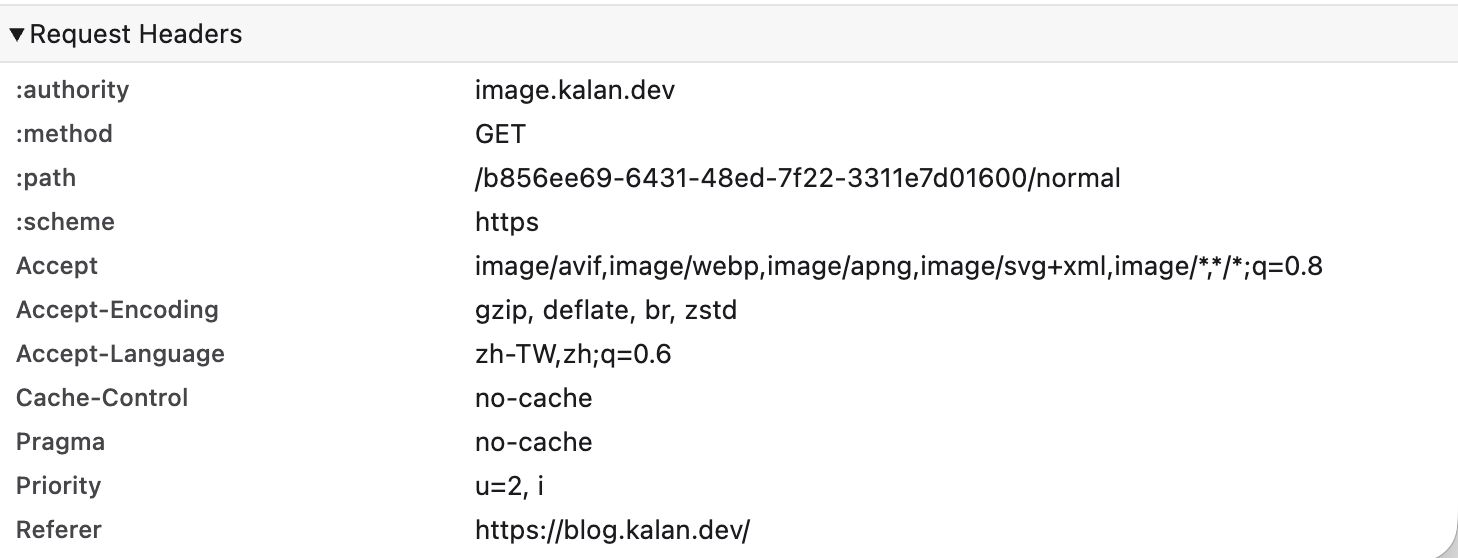
For instance, if you copy this image’s URL and inspect the Network tab in your browser, you’ll see the returned format is AVIF or WebP, depending on your browser support. Yet behind the scenes, there is only one original image—I didn’t perform any manual conversions.

Common operations are built-in: resizing, cropping (including face-based smart cropping), blurring, flipping, rotating, and adjusting brightness or contrast.
Naturally, you can also attach a custom domain. My images are hosted on image.kalan.dev; you just need the domain to be a zone under the same Cloudflare account6.
CDN caching is enabled by default. Transformed images are cached directly at Cloudflare’s edge. Any subsequent request for the same combination of (original image + parameters) is served from the nearest edge node without hitting origin again.
There are essentially two ways to use it: one is storing images directly on Cloudflare (Hosted Images), and the other is keeping images in your own storage (R2, S3, etc.) while leveraging its edge transformation capabilities (now called Transformations).
Pricing corresponds to these two modes. Storing with Cloudflare incurs charges for storage and delivery volume, whereas using only transformations charges by transformation count, along with a free tier7. The current pricing is as follows:
| Metric | Pricing |
|---|---|
| Images Transformed | First 5,000 unique transformations included + $0.50 / 1,000 unique transformations / month |
| Images Stored | $5 / 100,000 images stored / month |
| Images Delivered | $1 / 100,000 images delivered / month |
I also wrote a simple CLI tool to easily upload images to Cloudflare Images locally. Feel free to check it out if you’re interested: cloudflare-images-cli.
Footnotes
-
AVIF has landed — Jake Archibald. AVIF is derived from AV1 keyframes; the article’s benchmarks show that compressing an image with libavif at max effort can take over ten minutes. ↩ ↩2
-
next/image official documentation, covering on-demand optimization, memory limits, and
qualities/remotePatternsallowlists. ↩ -
Dynamic Image Transformation for Amazon CloudFront (formerly Serverless Image Handler). ↩
-
Cloudflare Images pricing. Refer to the official pricing page for actual free tiers and rates. ↩
Related Posts
- When a Measure Becomes a Target: From the Window Tax to Pull Request Counts I once wrote a script to tally how many PRs I contributed in a quarter, how many reviews I left, and how many tickets I closed, hoping to use numbers to prove my output to my manager. My manager simply remarked that performance isn't just about output. Years later, I finally understood—when a measure becomes a target, it ceases to be a good measure. From the British window tax and the Hanoi rat bounty to evaluating developers by PR counts today, the underlying mechanism is exactly the same.
- Stop Using AWS Access Keys Access Keys are an easily overlooked security risk in AWS. By pairing OIDC with IAM Roles, GitHub Actions can securely operate AWS resources without storing any secrets.
- Database Primary Keys: AUTO_INCREMENT, UUID, and UUIDv7 Backend developers often face the choice of primary keys: should you use auto-increment or UUID? What about collisions? How does UUIDv7 compare to created_at + index in performance? Here are the design decisions and benchmark results from testing 20 million rows.
- My Experience with Zeabur: A Hands-on Review Most indie developers turn to platforms like Vercel to deploy their services. But when it comes to more advanced requirements like database connections, Vercel becomes less convenient, and traditional cloud providers are often too expensive for indie development. In this article, I share my experience using Zeabur and why I recommend it!