A Journey into Parsing Japanese TV Subtitles
Preface
Have you ever watched TV in Japan? In Japan, the broadcast signal contains a wealth of information, including program schedules, video feeds (with switchable resolutions), subtitles (closed captions), and more. That is why you can toggle subtitles on and off on your TV.
So, how does it actually work under the hood? Today, let’s talk about parsing subtitles from Japanese television broadcasts.
I started digging into this technology because of an earlier tweet by Qianqian, combined with my long-standing interest in trying to hook up a tuner to my computer to watch TV. Through this, I unexpectedly discovered that there are many technical details worth learning.
Television Broadcasting in Japan
Japan’s television broadcasting relies on a domestically developed standard called ISDB (Integrated Services Digital Broadcasting). Signals are transmitted via terrestrial transmission towers; once individual households receive the TV signal, it is decrypted and restored to the original data.
B-CAS
To prevent unrestricted copying and protect copyright, Japanese TV signals are actually encrypted before transmission. This part is regulated under ARIB (STD-B25). The B-CAS card acts like a key—you must have this card to watch TV. If you have ever purchased a TV in Japan, it usually comes bundled with a B-CAS card; otherwise, you won’t be able to view any picture.
Broadcasters sign agreements with manufacturers willing to comply with copy-protection regulations and provide the encryption keys directly to them. These manufacturers then build hardware pre-loaded with these keys—for example, the many USB tuners available today that allow you to plug them into a computer to receive signals and watch TV. However, these tuners usually require downloading their proprietary player software to view programs normally. The reason, again, is to prevent unauthorized copying.
MPEG2-TS
MPEG2-TS is a container format for video, and Japanese broadcast transmissions typically use MPEG2-TS. Here, “TS” stands for Transport Stream. The video is usually encoded in h.262, while the audio uses AAC encoding. Because h.262 is relatively old, the file size for the same video content is larger. Typically, the .mp4 videos we watch on computers are encoded in h.264.
In terms of packet transmission, each TS packet has a maximum size of 188 bytes. During wireless transmission, noise and errors can occur; the small 188-byte size helps reduce latency while making error recovery easier.
You can refer to this diagram for a detailed breakdown of a TS packet:
For the detailed structure, see https://www.researchgate.net/figure/Detailed-structure-of-the-MPEG-2-transport-stream-TS_fig16_41949828
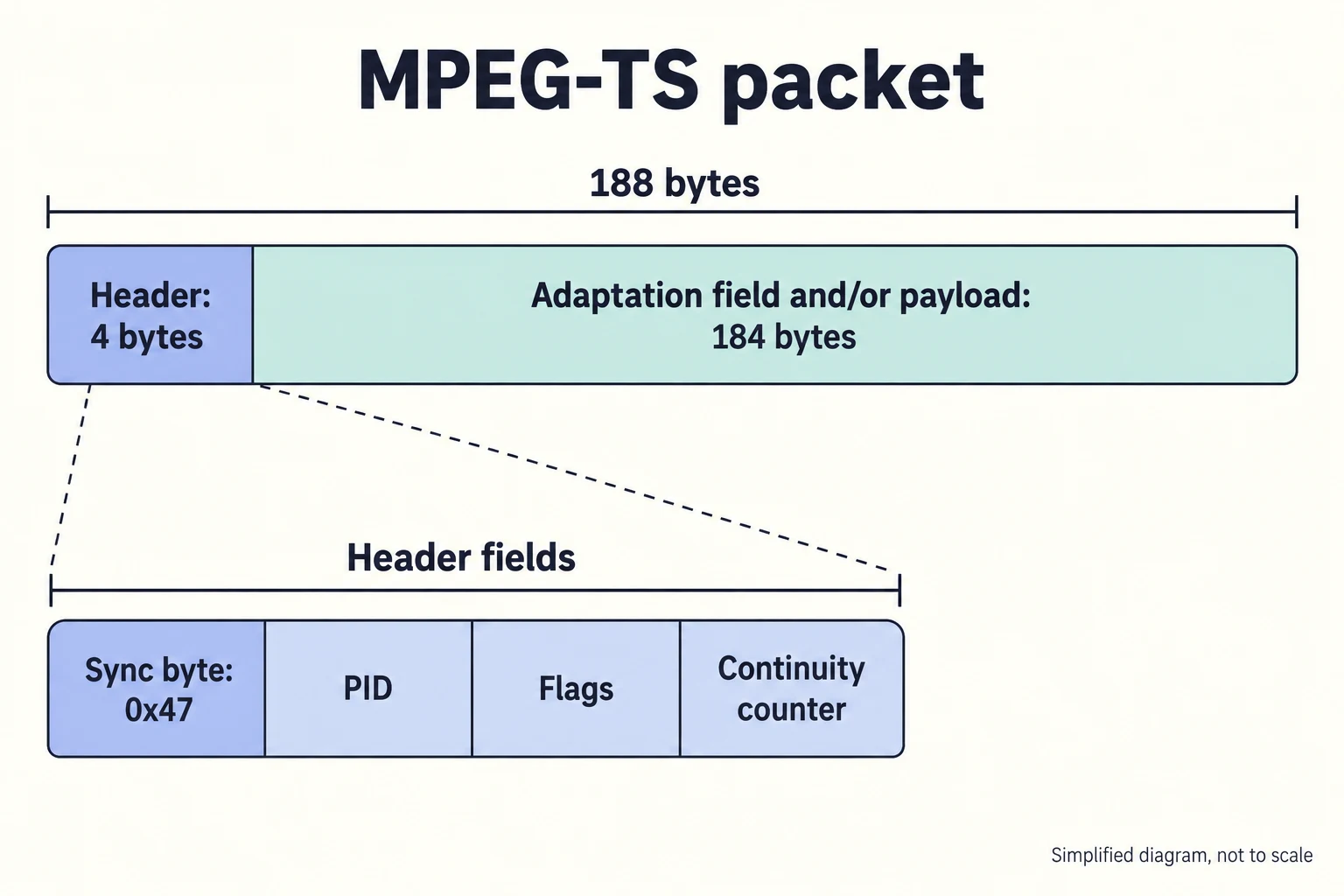
A few key fields include:
- sync_byte: Always
0x47 - PID: Packet Identifier, typically used to determine what the packet’s payload contains
- PAT: Program Association Table (PID mapping table)
- PES: Packetized Elementary Stream; subtitles, audio, and video are all encapsulated within PES
Parsing Subtitles
While there are many technical details regarding broadcasting that can be explored, due to length constraints, we will focus exclusively on parsing subtitles. The parsing and transmission of subtitles are defined by ARIB STD-B24.
The general process is as follows:
- Read packets until
0x47is found - Chunk the data into 188-byte packets for easier parsing
- Look up the PID mapping from the PAT (the PID for the PAT is 0)
- Once the caption PID is located, start parsing the data
data unit
In addition to “textual information,” caption data actually contains a lot of metadata, such as color, shape, and the position where the subtitles should be displayed. These pieces of data are distinguished using data units. The data unit for text information is 0x20.
function parseText(data, length) {
  const str = data.slice(0, length + 1);
  let result = "";
  let i = 0;

  while (i < length) {
    if (str[i] === 0x20) {
      result += " ";
      i += 1;
    }

    // // JIS X 0208 (lead bytes)
    if (str[i] > 0xa0 && str[i] < 0xff) {
      const char = str.slice(i, i + 2);
      if (str[i] >= 0xfa) {
        result += parseGaiji(char);
        i += 2;
      } else {
        const decoded = new TextDecoder("EUC-JP").decode(char);
        result += decoded;
        i += 2;
      }
    } else if (Object.values(JIS_CONTROL_FUNCTION_TABLE).includes(str[i])) {
      console.log("JIS_CONTROL_TABLE!");
      i += 1;
    } else if (str[i] >= 0x80 && str[i] <= 0x87) {
      console.log("color map");
      i += 1;
    } else {
      i += 1;
    }
  }

  console.log(result);
  document.querySelector("#result").innerHTML += result + "<br/>";
}
Since the text here uses the JIS X 0208 character set, it requires separate decoding. Fortunately, in JavaScript we can use TextDecoder, which happens to support EUC-JP, so using new TextDecoder('EUC-JP').decode directly will do the trick.
Furthermore, Japanese text rendering includes what are called “Gaiji” (external characters). These are defined by ARIB and do not exist in the JIS X 0208 standard. They are primarily used for displaying special icons/symbols, news tickers, and more: https://en.wikipedia.org/wiki/ARIB_extended_gaiji
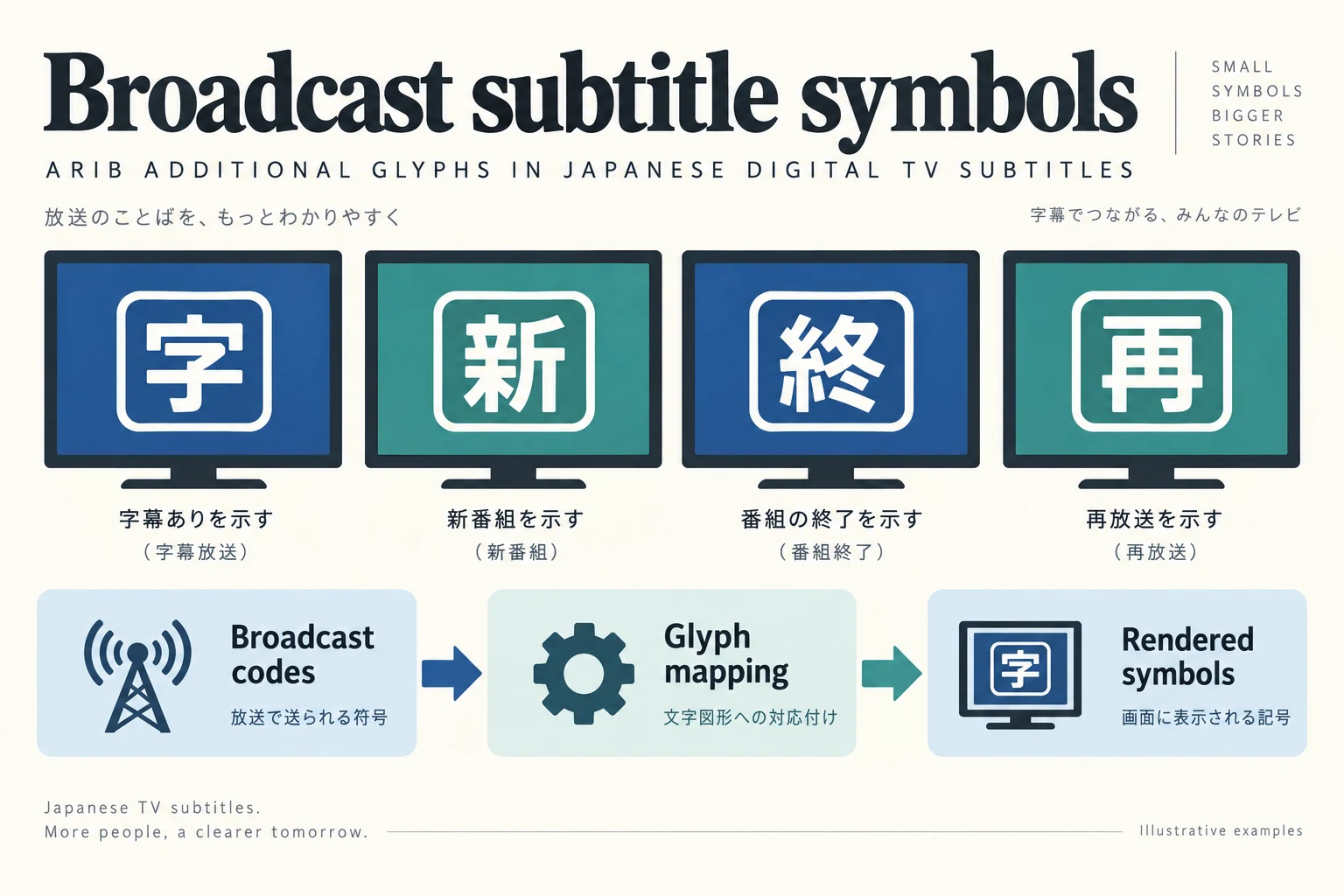
This type of character must be parsed separately. Once the subtitles are successfully parsed, the most critical part is displaying them on screen at the correct timing; during transmission, a time table is sent along to synchronize time.
Demo
I cannot upload the video material directly, so I am sharing the code and a conceptual subtitle-processing diagram. The diagram is not a screenshot of the running demo. You can try the implementation yourself.
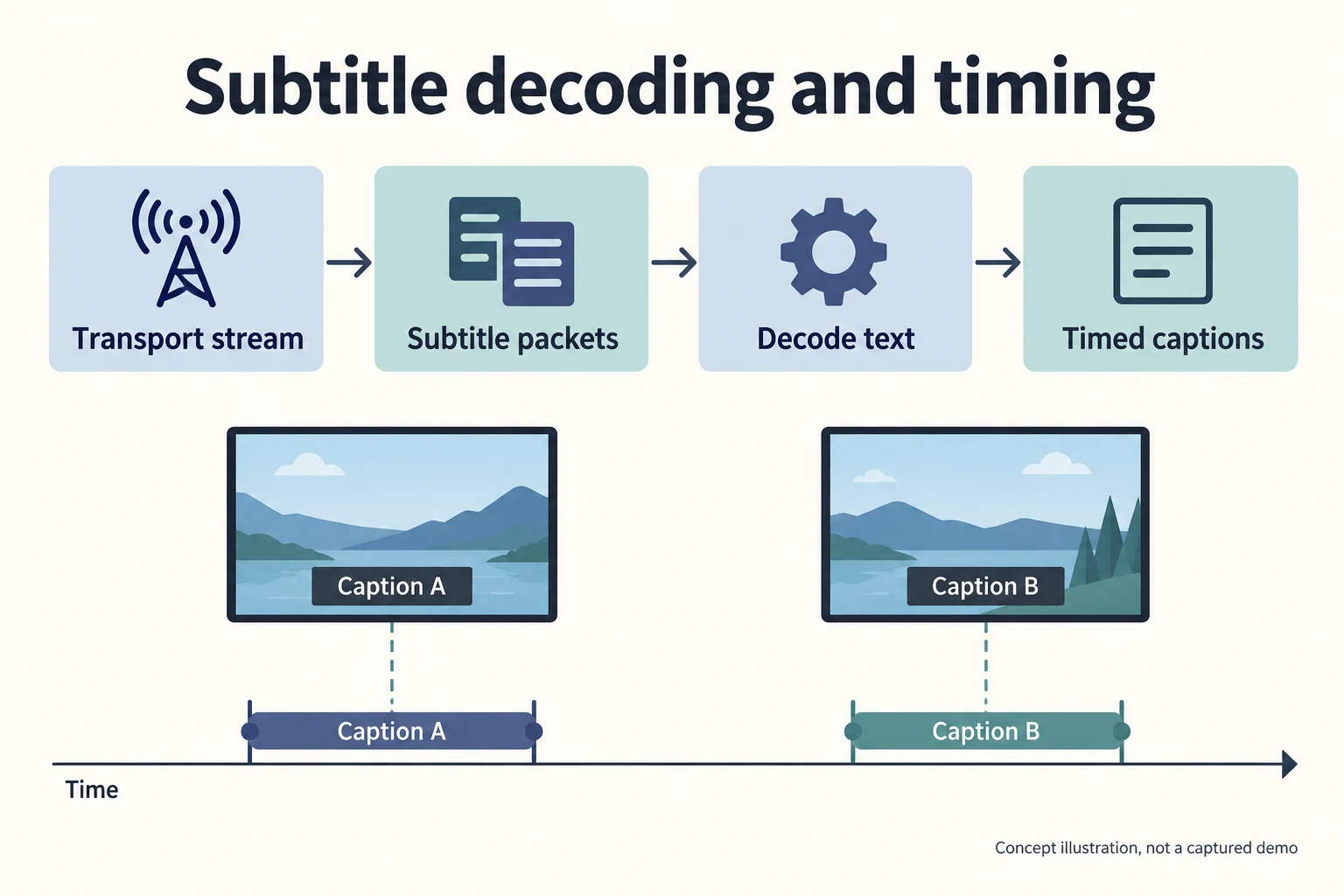
https://github.com/kjj6198/ts-arib-parse/tree/master
Other Technical Details
Because the video is encoded in h.262, most web browsers do not support it natively. If you want to play it in a browser, you would either need to software-decode h.262 using WebAssembly—which is extremely CPU-intensive and requires downloading a massive WASM bundle before playback even starts (fine as a toy project, but the actual user experience is terrible)—or, in most cases, use a tool like FFmpeg to transcode h.262 into h.264 so it can be played back on the web.
A well-known open-source solution currently is mirakurun. Its approach is to spin up a server that continuously transcodes the broadcast stream into h.264 and streams it back, allowing you to watch it directly in a browser.
In addition, here are some open-source projects for reference:
Afterword
Even for something seemingly as simple as displaying subtitles, there are many technical details worth learning under the surface. I learned a great deal throughout this implementation. For instance, I didn’t previously know how the MPEG-TS format worked, nor was I aware of the existence of ARIB and ISDB-T—yet these specifications have supported Japanese broadcasting for many years.
Once you get your hands dirty, you realize it’s not as intimidating as it might seem (at least for subtitle parsing; reconstructing the raw RF signals is completely over my head). As long as you have the patience to read through the specifications, you can implement it yourself.
Related Posts
- Seam Carving – Resizing Images Non-Proportionally Seam Carving finds the least important path of pixels in an image and removes it, so the image can be resized without keeping its aspect ratio. This post rewrites the whole algorithm as WebGPU compute shaders, with an interactive demo.
- When a Measure Becomes a Target: From the Window Tax to Pull Request Counts I once wrote a script to tally how many PRs I contributed in a quarter, how many reviews I left, and how many tickets I closed, hoping to use numbers to prove my output to my manager. My manager simply remarked that performance isn't just about output. Years later, I finally understood—when a measure becomes a target, it ceases to be a good measure. From the British window tax and the Hanoi rat bounty to evaluating developers by PR counts today, the underlying mechanism is exactly the same.
- Using Cloudflare Images for Image Storage and Transformation Putting an image on a webpage is the simplest task in frontend development. But doing it properly—including resizing, generating multiple formats, and withstanding heavy traffic—is actually an entire end-to-end solution. Eventually, I offloaded everything to Cloudflare Images, keeping only a single original image.
- Stop Using AWS Access Keys Access Keys are an easily overlooked security risk in AWS. By pairing OIDC with IAM Roles, GitHub Actions can securely operate AWS resources without storing any secrets.